Published in Tutorials
How to Build Your AI Implementation Roadmap
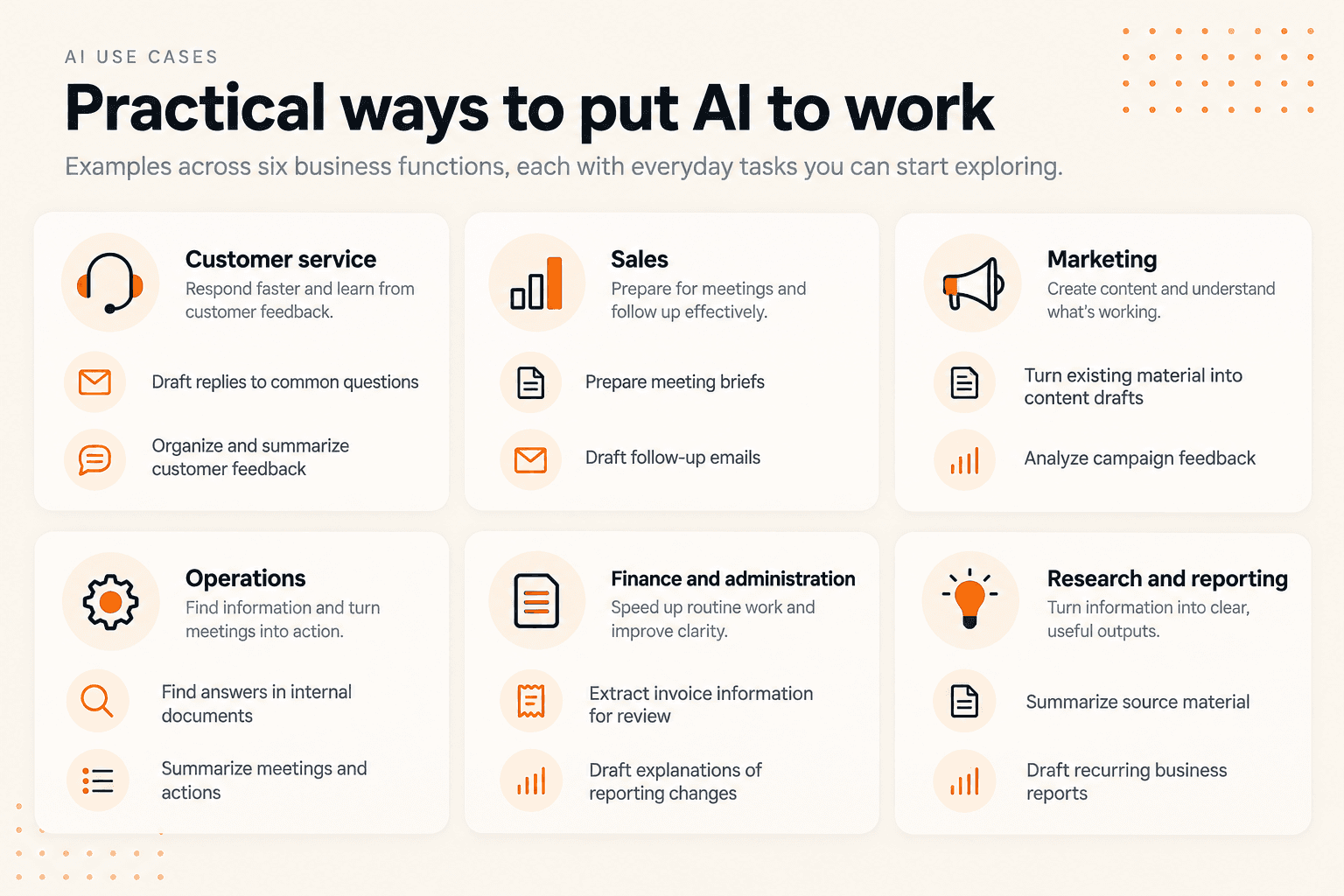
An AI implementation roadmap is a plan for moving from a business problem to a tested use of AI. It identifies what you want to improve, who will do the work, what they need, and how you will decide whether the result is worth continuing.
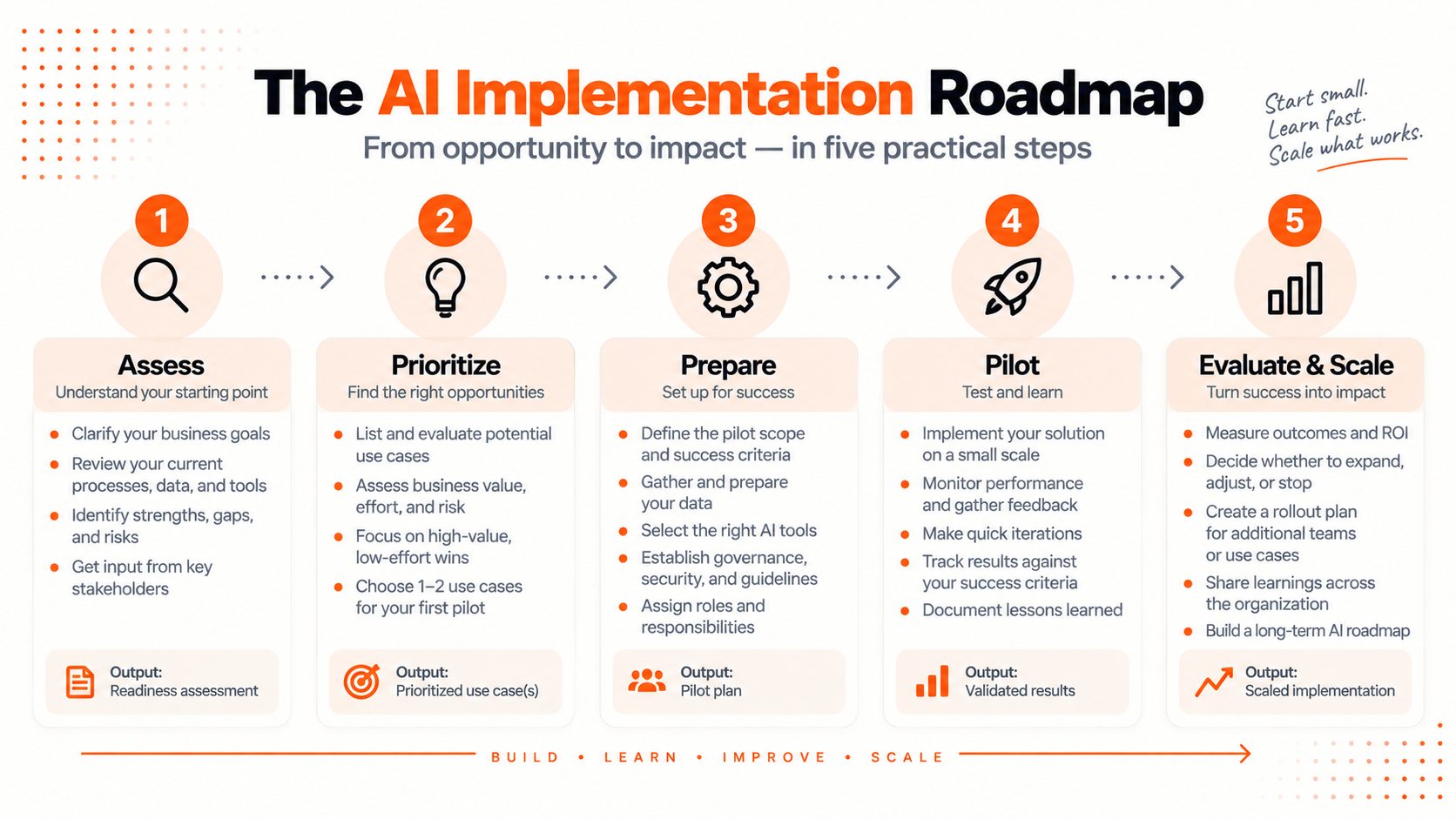
You can build one in a document, a spreadsheet, or a few presentation slides. Start with one workflow you understand, such as preparing client reports, summarizing meetings, or responding to routine questions. Then work through five phases: Assess → Prioritize → Prepare → Pilot → Evaluate & Scale.
This guide walks you through each phase and shows how to turn your decisions into a 90-day plan. The visuals are examples you can recreate using the tools you already have. Their ratings, schedules, and results are illustrative, not findings from a client project or promises about your own results.
What should an AI implementation roadmap include?
A useful roadmap answers six questions:
- Problem: Which part of the work needs to improve?
- Outcome: What measurable change would make the effort worthwhile?
- Scope: What will the first pilot do, and where will it stop?
- Ownership: Who runs it, who reviews the output, and who decides what happens next?
- Resources: What data, tools, time, and budget does it need?
- Checkpoints: When will you review progress and decide to expand, adjust, or stop?
Your AI strategy establishes the business priorities. Your roadmap turns a selected priority into work someone can carry out. You do not need to resolve every possible use of AI before starting a small, well-defined experiment.
Jump to finding opportunities, choosing a use case, preparing your pilot, building a 90-day plan, or measuring results.
1. Assess: find opportunities in the work you already do
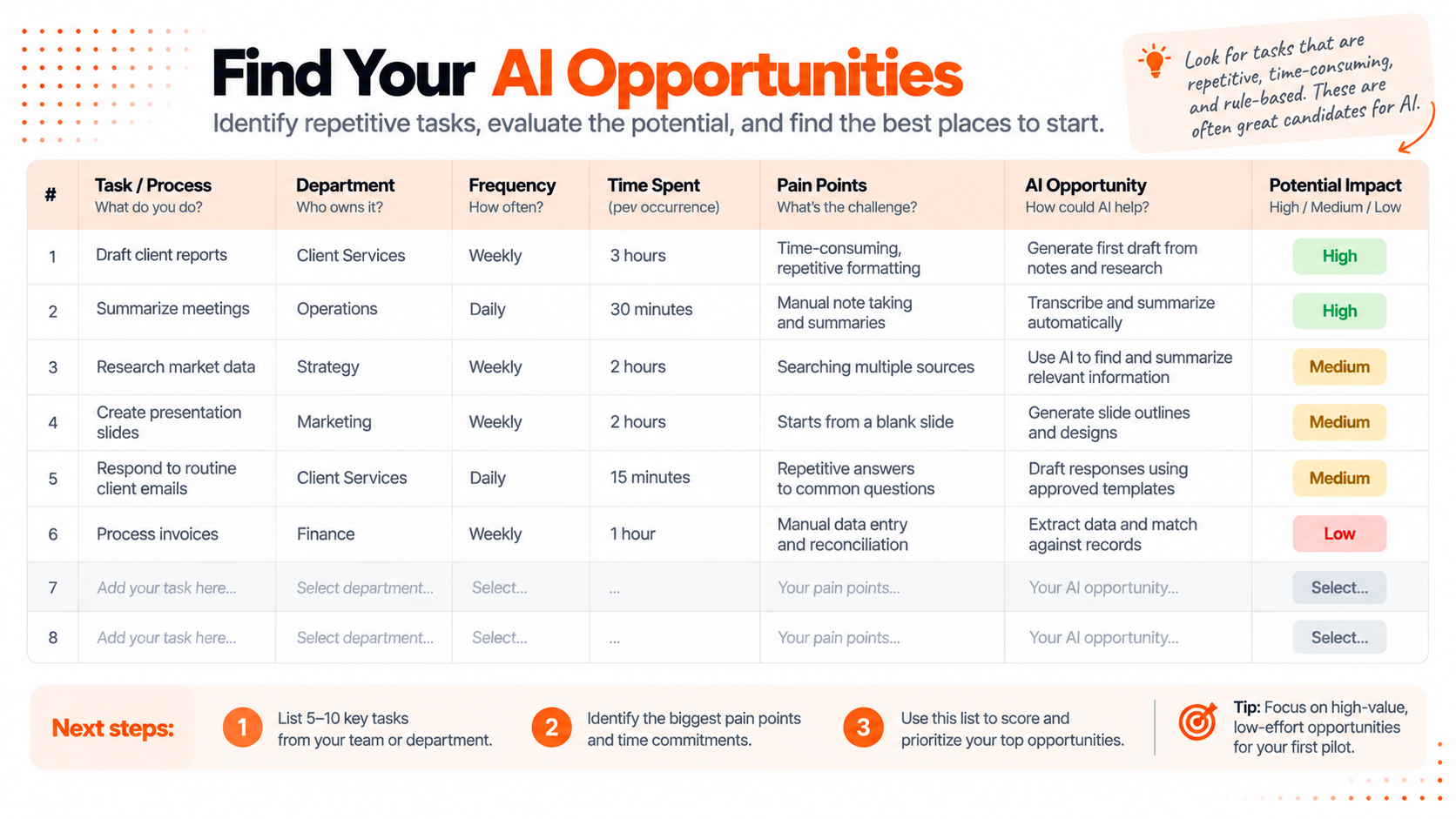
Ask the people doing the work to identify five to ten recurring tasks. For each task, note how often it happens, how much time it takes, what information it uses, and where people get stuck.
Be specific. “Improve reporting” is difficult to plan around. “Prepare the first draft of a weekly client update from approved project notes” gives you a task, a source, and an output to examine.
Follow one task from start to finish
For a client report, the work might involve collecting notes, checking figures, drafting the update, reviewing it, and sending it. Record time for those activities separately. A slow drafting step suggests a different intervention from a slow approval process.
In our fictional example, a small consulting team chooses to investigate report drafting. Its first hypothesis is: AI could help turn approved notes into a draft, while a consultant remains responsible for checking and sending it. That is something the team can test.
Before putting a task on your AI shortlist, consider whether a standard template, a formula, or an ordinary automation rule would solve it more simply. A repetitive task does not automatically need AI. AI is a candidate when the work involves variable language or information that needs interpretation, and you have a practical way to check the output.
Add to your roadmap: the workflow, the current problem, the person responsible, and a baseline you will measure before changing the process.
2. Prioritize: choose one use case to test first
Compare your candidate tasks on two separate dimensions: business value and implementation effort.
For value, consider how frequently the problem occurs, how much time or rework it creates, and whether fixing it supports an important business goal. For effort, consider setup, access to usable data, integrations, training, and the ongoing work of reviewing results.
Give each dimension a score from one to five. Write a sentence explaining each score so colleagues can challenge the assumptions. These are planning judgments, not precise measurements.
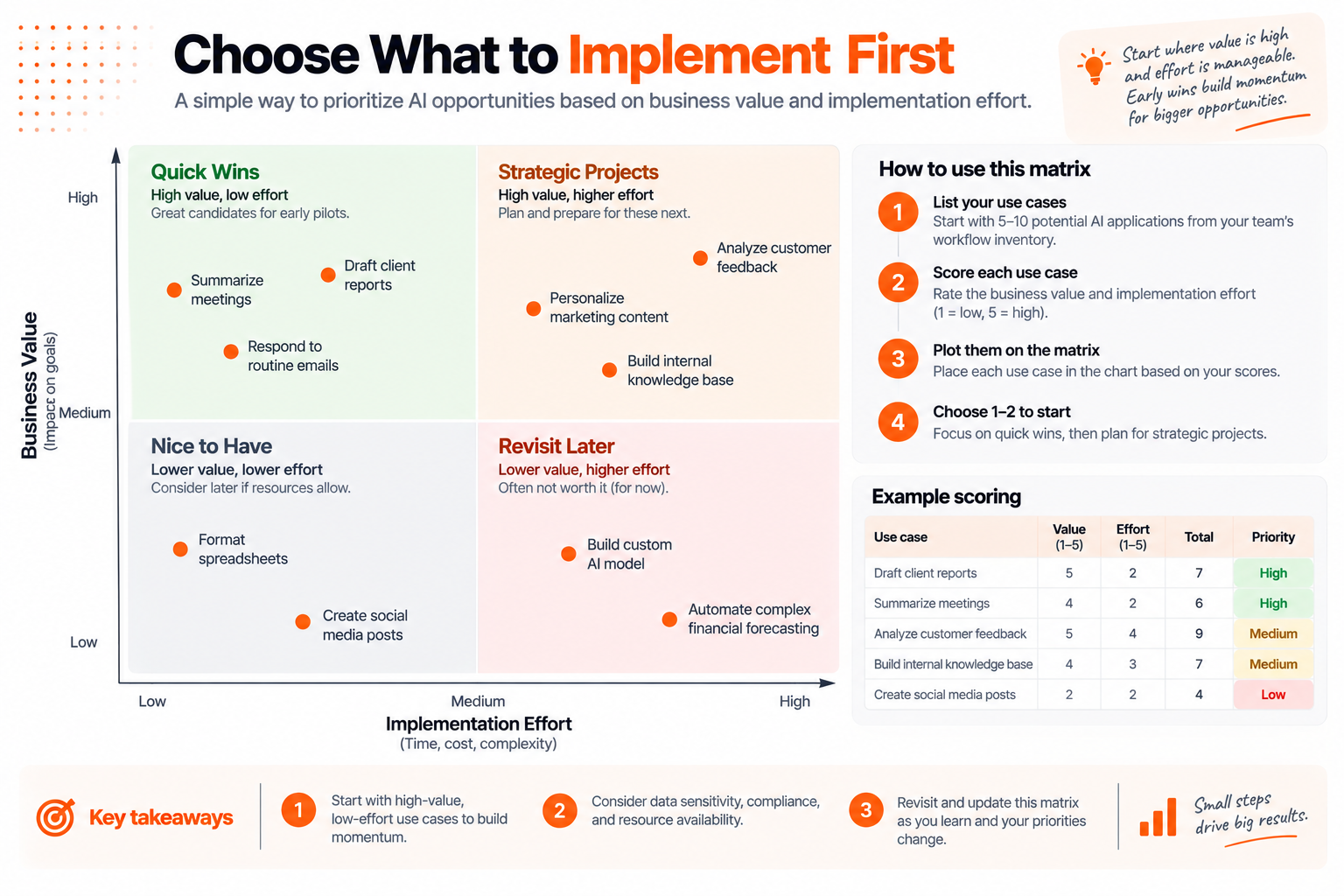
High value with manageable effort makes a useful starting point, provided the use case also passes a risk check. Ask what happens if the output is wrong, whether the necessary data is approved for use, and whether a person can catch mistakes before they affect someone else.
For our consulting team, report drafting might be a better first experiment than automatically sending client recommendations. Both involve writing, but the second introduces consequences and dependencies the first pilot does not need.
Choose one use case and write down why it comes first. Keep the remaining ideas for later. A team can learn more from finishing one bounded pilot than from starting several without enough time to evaluate them.
Add to your roadmap: the selected use case, the reason for choosing it, and any conditions that must be resolved before work starts.
3. Prepare: define the pilot before choosing the tool
Write a short pilot brief. Someone unfamiliar with the project should be able to read it and understand what will happen.
For the fictional report-drafting pilot, it could say:
Test AI-assisted drafting of weekly client updates using approved project notes. Two consultants will use the same report outline and review every draft before sharing it. The pilot will not send messages automatically or generate recommendations without supporting source material. Compare total preparation time and review quality with the existing process over four weeks.
Next, agree on a target. For example, you might aim to reduce total preparation time per report by 25% while maintaining your quality standard. That is an example target to test, not an expected result.
Define the quality standard in observable terms: required sections are present, figures match the source, important statements are supported, and missing information is flagged. Decide which errors would require pausing the pilot even if it saves time.
Get the inputs and responsibilities ready
Identify the source documents, check who can use them, and remove information the task does not need. Select a tool based on the input formats, review workflow, access controls, and costs your pilot requires. Our comparison of AI tools for work can help you explore options once those requirements are clear.
Assign a pilot owner, a reviewer, and a decision-maker. In a small business, one person may hold more than one role, but each responsibility still needs an owner. Reserve time for setup, training, review, and troubleshooting as well as the actual test.
For a more detailed approach to identifying and managing AI risks, the voluntary NIST AI Risk Management Framework provides a useful reference. Use it to deepen the assessment where your project needs more scrutiny.
Add to your roadmap: scope, inputs, tool requirements, owners, budget, success criteria, and a start condition. Begin the pilot only when those essentials are ready.
4. Pilot: build your own 90-day AI roadmap
The following schedule is a planning example for a limited business workflow. A simple experiment may take less time; a project with substantial data preparation or integration work may take longer. Move the dates to fit the work rather than expanding the scope to fill 90 days.
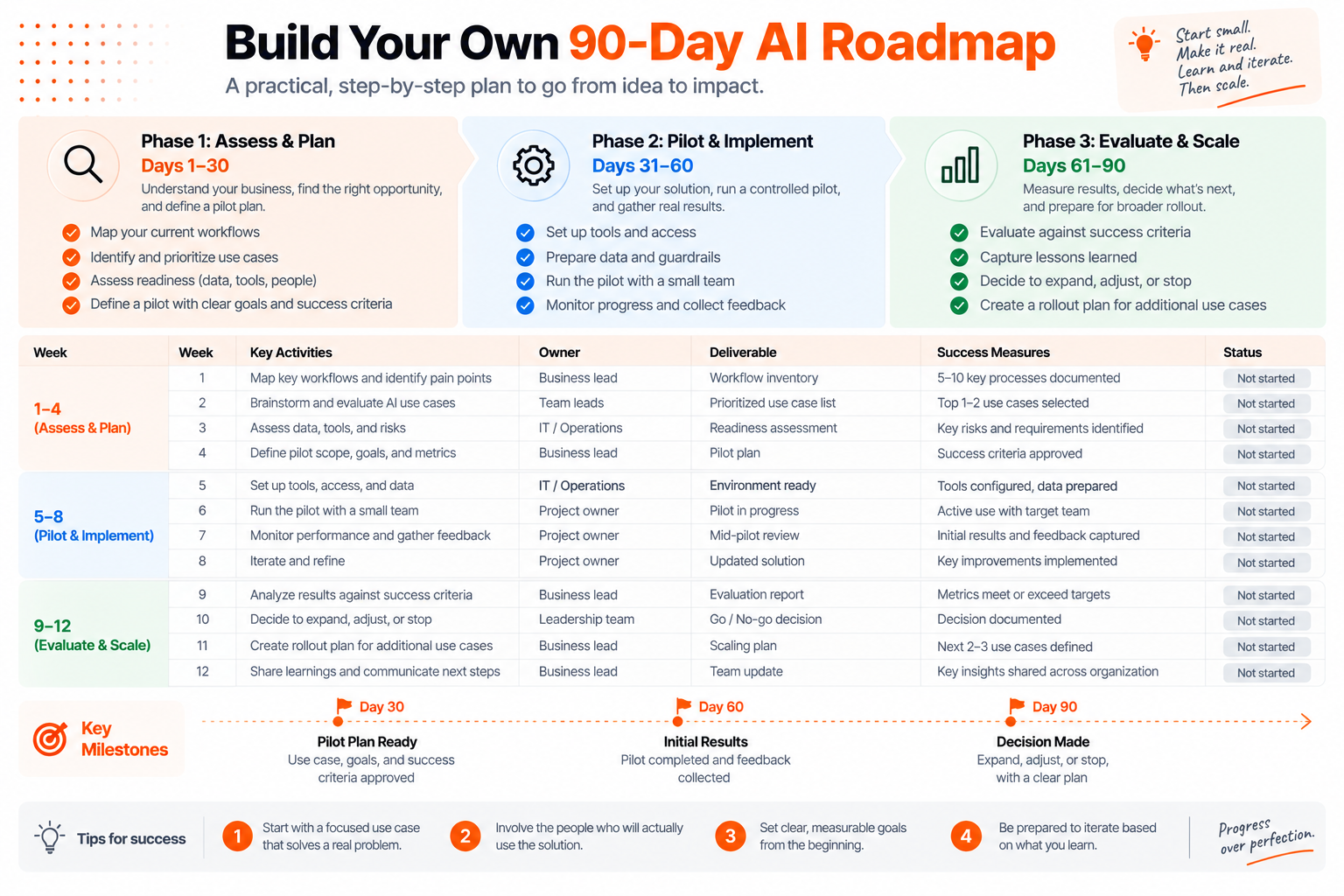
Days 1–30: assess and plan
Map the workflow, collect baseline examples, compare opportunities, and select the pilot. Confirm access to the data and agree on the evaluation method. Finish with a brief the pilot owner and reviewer can both use.
Day 30 checkpoint: Are the scope, inputs, owners, and success criteria clear enough to start? If an essential dependency is missing, resolve it before moving ahead.
Days 31–60: prepare and run a controlled pilot
Set up the tool and show participants how to complete the task, check the output, and record problems. Start with a small group and keep the existing process available if the experiment fails.
For the report example, save the source notes, initial draft, reviewed report, time spent, and corrections for each test. That record helps distinguish a fast draft from a useful finished report. See our guide to writing reports with AI for ideas on structuring the drafting and review steps.
Review progress weekly. When you change a prompt, source format, or tool setting, record what changed. Otherwise, you may struggle to explain why later results differ from the first batch.
Day 60 checkpoint: Do you have enough comparable examples to evaluate? If there were too few real tasks, extend the test rather than claiming success from one good output.
Days 61–90: evaluate and choose the next step
Compare results with the original baseline and targets. Ask participants what helped, what created extra work, and whether they would continue using the process. Include errors and abandoned attempts in the review.
Prepare a decision to expand, adjust, or stop. If you expand, define the next scope, its owner, and its review date. If you stop, record why so the next project benefits from what you learned.
Day 90 checkpoint: Is there a documented decision supported by the results? A completed evaluation is the milestone; meeting every target is not a requirement for learning from the pilot.
5. Evaluate: measure whether your AI pilot worked
Create a simple scorecard with a baseline, target, actual result, and decision. Choose measures that reflect the problem you set out to solve, and define how you will collect each one before the pilot starts.
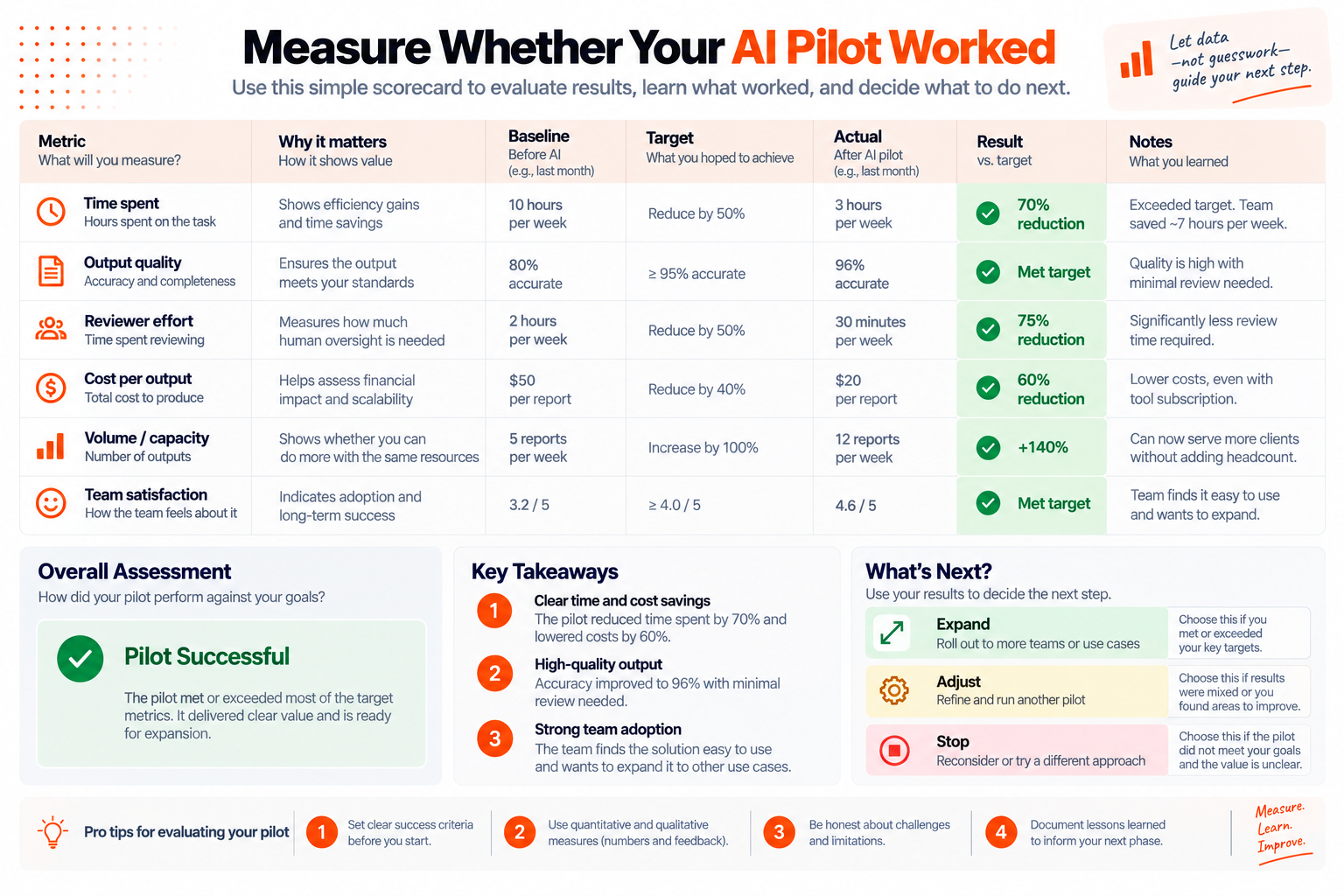
For a drafting workflow, useful measures include:
- Time per finished report: count preparation, drafting, review, and corrections. If review time is also tracked separately, do not add it twice.
- Quality: use the same review checklist before and during the pilot. Define what an accuracy percentage means and how many items were checked.
- Cost per finished report: include labor and tool usage, and report one-time setup costs separately so they remain visible.
- Adoption: record whether people actually used the workflow and what prevented them from using it.
Compare similar tasks with similar complexity. If output volume changes, use time per report alongside weekly totals. Faster production is only useful if the reports still meet the required standard.
For example, a change from 120 to 90 minutes per comparable report represents a 25% time reduction: subtract the new time from the baseline, then divide by the baseline. Across ten reports, that would release five hours of capacity. Whether those hours become financial savings depends on what the business does with them.
Make the decision explicit
Expand when the workflow meets the agreed criteria, people can operate it reliably, and the next scope has appropriate support. Expand gradually and keep measuring.
Adjust when the results show promise but a specific problem remains. If drafting is faster but reviewers spend longer correcting unsupported statements, improve the input or review process and run another test.
Stop when the benefits do not justify the cost, the quality is unacceptable, or the necessary inputs cannot be used appropriately. A clear stop decision prevents a weak experiment from becoming an ongoing obligation.
Add to your roadmap: the evidence, decision, next owner, and next review date. This turns the roadmap into a record of what you learned as well as what you planned.
Common AI roadmap mistakes to avoid
Starting with a product purchase. Describe the task and success criteria first so you can judge whether a tool fits.
Leaving out review time. Measure the complete workflow. A draft that takes seconds can still require extensive correction.
Treating every use case as equally safe to test. A suggestion a colleague checks before use has different consequences from an automated action affecting customers.
Skipping the baseline. Without observations of the current process, improvement becomes an impression rather than a comparison.
Scheduling expansion before seeing results. Make rollout conditional on the evaluation, and give someone responsibility for monitoring after the pilot.
AI implementation roadmap FAQs
Do I need technical expertise to create a roadmap?
You can map a workflow, define goals, assign owners, and plan an evaluation without building software. Bring in technical help when the selected project requires integrations, access changes, custom development, or specialist evaluation. Identifying that dependency is part of the roadmap.
How detailed should the first roadmap be?
Detailed enough that each activity has an owner, an expected output, and a checkpoint. A short document or a few slides can be sufficient for one pilot. Add detail where a dependency or decision would otherwise be unclear.
Can I use AI to help write the roadmap?
Yes. Give it your workflow description, constraints, owners, and goals, and ask it to organize a draft. Tell it to flag missing information rather than inventing costs, timelines, or performance estimates. Review the plan with the people who will carry it out.
Does an AI implementation roadmap have to cover 90 days?
No. Ninety days is an example planning window. Set the duration around preparation needs, the frequency of the task, and how much evidence you need to make a decision.
Start with one workflow
Open a document and write down one recurring task, what makes it difficult, who owns it, and how you could measure improvement. Speak with the person doing the work and check those assumptions together.
Then add the smallest pilot that would give you useful evidence. Give it an owner, a review date, and clear criteria for what happens next. You now have the foundation of an AI implementation roadmap you can build on.

ML Clever Team
Product Team
Get new ideas in your inbox.
Practical AI workflows and product notes from ML Clever.