Published in Tutorials
How to Write Standard Operating Procedures: An SOP Example
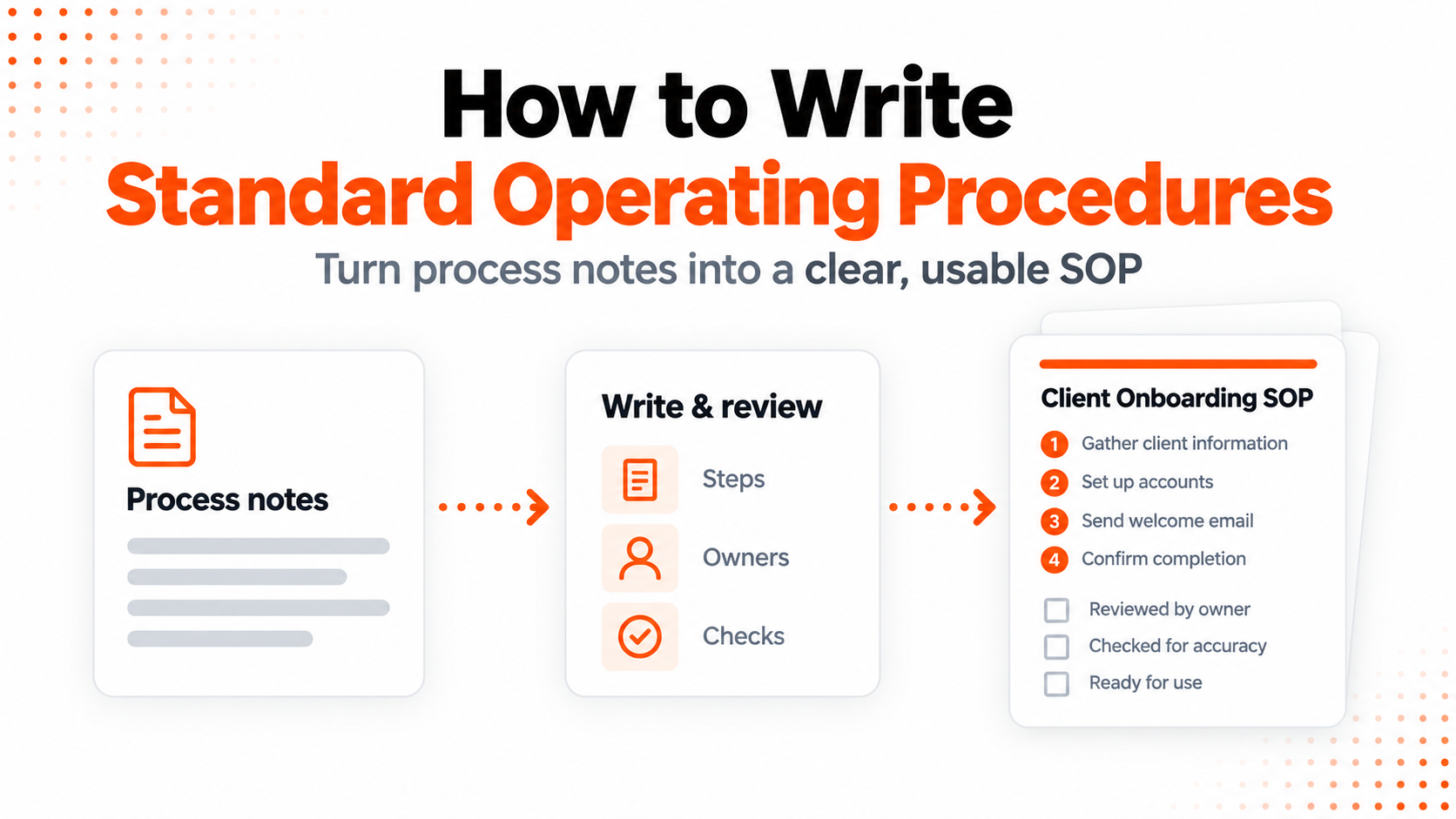
To write a standard operating procedure, define the task, record how it works, give each step an owner and a clear result, and test the instructions with someone who will use them. Add exceptions, completion checks, and a process for keeping the document current.
An SOP is useful when it answers the questions people otherwise ask in chat: Who does this next? Where do I find the information? What happens if something is missing? When is the task finished?
This guide works through a client onboarding procedure, from the initial notes to a four-page draft and the edits it needs before use. The example is fictional. The screenshots show ML Clever, the product we build, and the generated document; the writing and review method also works if you draft your SOP manually.
To start with the document, open the standard operating procedure template. It includes all four example pages, a prompt you can customize, and an option to copy the document into your workspace.
How to write an SOP in six steps
- Define the process, reader, and boundaries.
- Collect the inputs and actual process notes.
- Turn each action into a usable instruction.
- Draft the SOP, with an optional AI prompt.
- Check the draft against the brief.
- Test, approve, and maintain the procedure.
You can jump directly to the copyable SOP prompt, review checklist, or frequently asked questions.
What should a standard operating procedure include?
A standard operating procedure is a set of written instructions for a recurring task. Use a format that makes the work easy to follow:
| Section | What the reader needs to know |
|---|---|
| Title and document details | Which process this covers, its version, owner, and approval status |
| Purpose and scope | Why the process exists and where it starts and ends |
| Inputs and access | What must be available before the work begins |
| Roles | Who performs, reviews, and receives the work |
| Numbered steps | What to do, in what order, and when |
| Exceptions | How to handle missing information, conflicts, and delays |
| Completion checks | What evidence shows that the work is finished |
| Review and change record | Who maintains the SOP and what has changed |
For the onboarding example, a step table works well because several people exchange information. A short checklist may be enough to support an experienced person doing a simple task; a branching process may also need a decision diagram. Choose the format after understanding the work.
Step 1: Define the process, reader, and boundaries
Start with a process small enough to explain from beginning to end. “Client operations” is broad. “Onboard a new marketing-services client from signed agreement to kickoff” gives the document a clear boundary.
Here is the brief for our fictional agency, Brightlane Studio:
| Brief item | Example |
|---|---|
| Process | Client onboarding |
| Readers | Sales Lead, Account Manager, Project Manager, and Operations Lead |
| Purpose | Give delivery a consistent handoff and tell the client what happens next |
| Trigger | A marketing-services agreement has been signed |
| Includes | Handoff, welcome message, input collection, project setup, and kickoff |
| Excludes | Proposals, contract negotiation, billing, and ongoing campaign delivery |
| Completion | Kickoff and recap are complete, outstanding actions have owners, and Operations has reviewed the checklist |
| Operating target | Kickoff within seven business days of signature when required inputs and participants are available |
The timing is an example target to adapt to your own process. It depends on information and availability; the SOP should explain how to communicate a revised date when those conditions are not met.
Name the reader's expected knowledge, too. If the instructions are for a new Account Manager, unexplained abbreviations and references such as “put it in the usual folder” leave important work undocumented.
Step 2: Collect the inputs and process notes
Ask the people performing the task to walk through a recent case. Record the sequence, the materials they use, who receives each handoff, and the problems that change what happens next. Gather links to the forms, folders, or existing instructions they actually need.
Useful questions include:
- What event tells you to start?
- What must you receive before you can act?
- What do you create or update, and where does it go?
- Who takes over next, and how do they know it is ready?
- What happens when an input is missing or the request changes?
For this tutorial, the following notes summarize the fictional brief behind the example. You can use them to try the workflow. They are supplied example rules, not findings from a real agency.
Example process: client onboarding at Brightlane Studio, a fictional marketing agency.

Start after the service agreement is signed. Cover sales handoff through project kickoff. Exclude proposals, contract negotiation, billing, and ongoing campaign delivery.

Sales Lead confirms the signed agreement and agreed scope, then records the client, contacts, services, deliverables, and commitments. Within one business day of signature, send the handoff to the Account Manager with goals, scope, contacts, timeline assumptions, discovery notes, and open questions. Keep agreed commitments separate from ideas discussed during sales.

Account Manager reviews the handoff within one business day of receiving it. Resolve gaps with Sales and escalate conflicting scope to Operations Lead. Within one business day of accepting the handoff, send the welcome email and request brand guidelines, existing assets, goals, reporting preferences, and the primary decision-maker. Use approved access invitations rather than collecting passwords.

Project Manager creates the workspace, links approved materials, assigns delivery owners, drafts milestones, and schedules kickoff with the client contact. Identify missing inputs that would prevent a useful kickoff. At kickoff, confirm goals, scope, responsibilities, milestones, communication, and open questions. Send a recap with actions, owners, and dates within one business day afterward.

Target kickoff within seven business days of signature when required inputs and participants are available. This is an operating target, not a guaranteed turnaround.

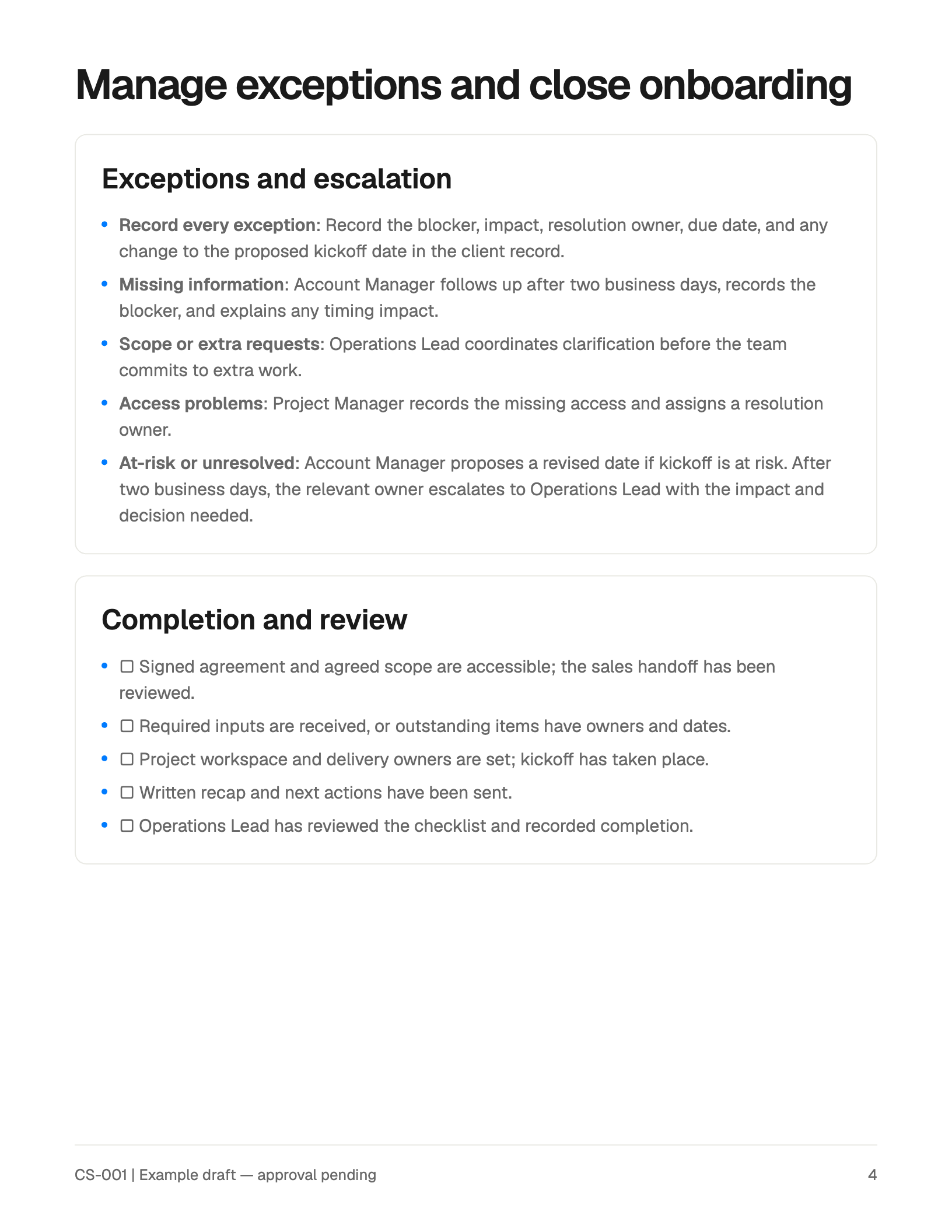
For missing client information, Account Manager follows up after two business days and records the timing impact. Operations Lead handles conflicting scope before extra work is promised. Project Manager assigns access problems to a resolution owner. If kickoff is at risk, Account Manager proposes a revised date for confirmation. Escalate a blocker still unresolved after two business days to Operations Lead.

Finish when the agreement and scope are accessible, the handoff is reviewed, inputs are received or outstanding items have owners and dates, the workspace and delivery owners are set, kickoff and recap are complete, and Operations Lead has reviewed the completion checklist.

Document details: CS-001, version 1.0, example draft with approval pending. Owner: Operations Lead. Approver: Head of Client Services. Prepared October 10, 2026; next review January 10, 2027, or earlier if the process changes. Do not invent an approval or prior revision history.
For a real SOP, separate how the work happens today from changes you would like to introduce. If the team disagrees about an owner or deadline, resolve that question or mark it as open. A writing tool cannot establish the company's process for you.
Step 3: Turn actions into instructions someone can follow
For each step, answer four questions: Who acts? When? What do they do? What confirms completion? Include the location of supporting information when the reader needs it.
Compare these versions of the same instruction:
| Too vague | Usable instruction |
|---|---|
| Send the handoff promptly. | Within one business day of signature, the Sales Lead sends the Account Manager the client record, agreed scope, goals, contacts, timeline assumptions, notes, and open questions. |
| Check the client information. | The Account Manager checks the handoff for missing essential information, resolves gaps with Sales, and assigns an owner and due date to each remaining question. |
| Escalate if needed. | If a blocker remains unresolved after two business days, send the Operations Lead the blocker, impact, resolution owner, and decision required. |
Use action verbs such as record, compare, send, confirm, and assign. Add a decision point when the next action depends on what someone finds. For example, conflicting scope goes for clarification before the team promises additional work.
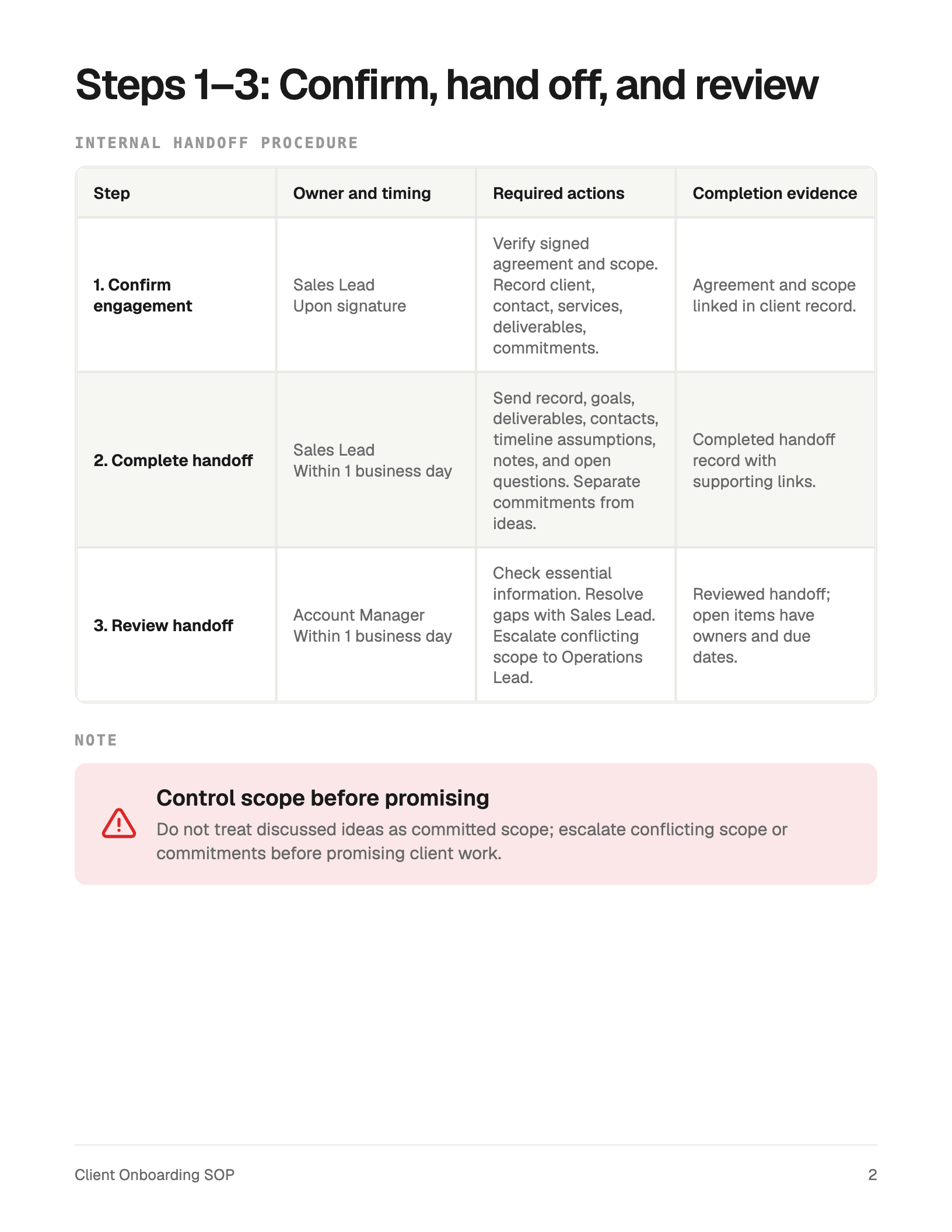
The example's second page puts the first three steps into a table with an owner, timing, actions, and completion evidence. We will check the wording more closely in Step 5.
Step 4: Draft the SOP with a clear structure
You now have enough material to write the document. For this example, the structure is:
- Purpose, scope, process ownership, and start conditions.
- Confirming the engagement, completing the handoff, and reviewing it.
- Welcoming the client, preparing the project, and running kickoff.
- Exceptions, escalation, and completion checks.
Include document control details in a readable block, and expand the layout if those details or the instructions need more space. Four pages are the example length, not a requirement for every SOP.
A reusable AI prompt for writing an SOP
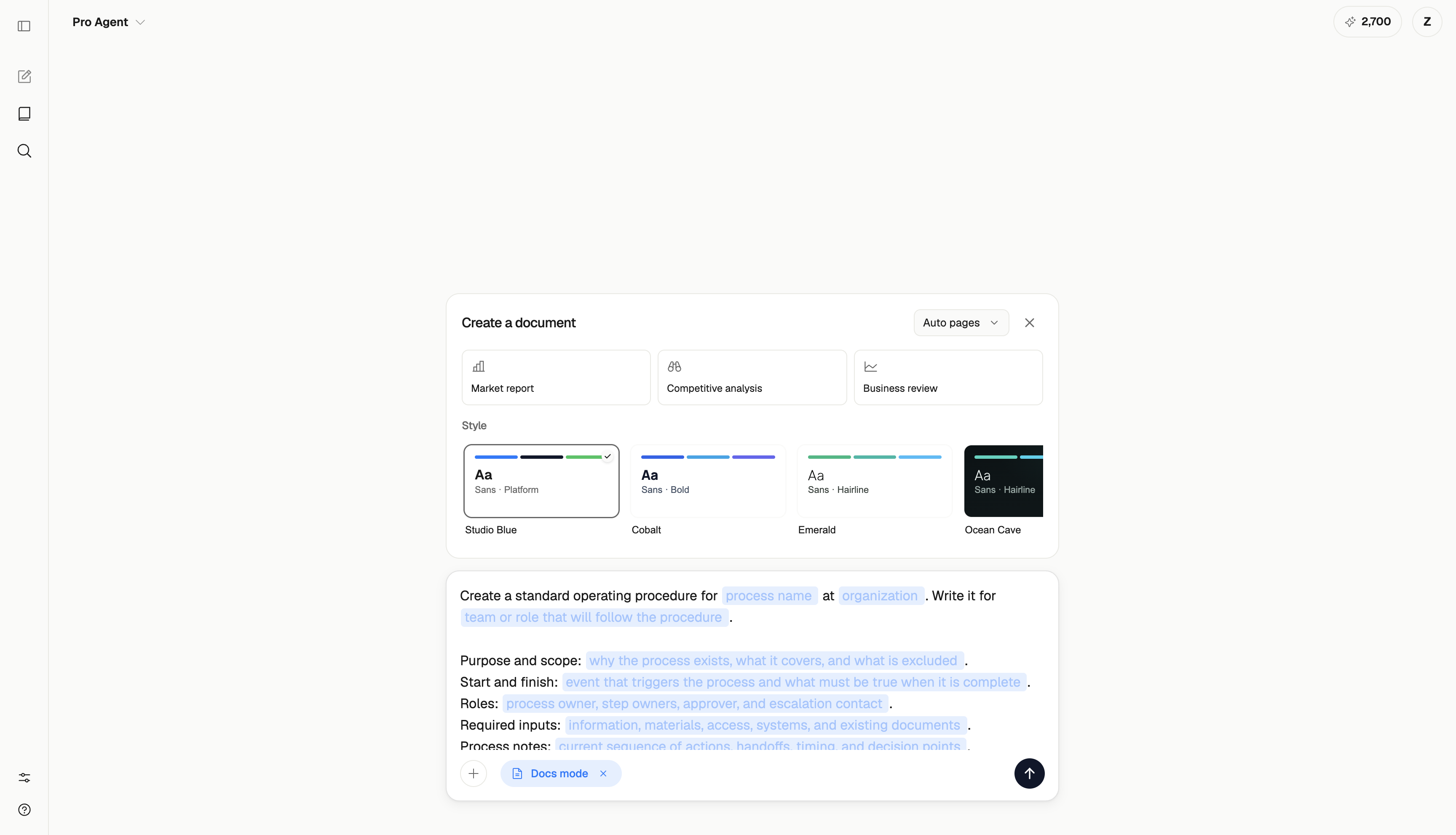
In ML Clever AI Documents, open Docs mode, choose a theme, and replace the prompt fields with your process details. Paste your notes into the brief or attach the source documents you want to use.
The screenshot below shows the reusable prompt from our template page loaded in Docs mode, with Studio Blue selected. Its highlighted fields still need to be replaced. It shows the setup for a new document, rather than a record of the exact filled brief used to create the four-page example.
Use this shorter prompt with your notes, or customize the more detailed prompt on the SOP template page:
Create a standard operating procedure for [process] at [organization], written for [people who will use it]. Use the process notes below and any attached source documents.

Process notes:
[Paste the purpose, scope, start and finish conditions, inputs, roles, actions, timing, exceptions, completion checks, and document details here.]

Include:
- Purpose, scope, and the event that starts the process.
- Required information, materials, and access.
- Roles and responsibilities.
- Numbered steps showing the owner, timing, action, and completion evidence.
- Exceptions and escalation, with the responsible person or role.
- An unchecked completion checklist.
- SOP ID, version, owner, approval status, review date, and a revision log using only supplied information.

Write timing relative to a specific event. Spell out abbreviations. Keep current instructions separate from proposed improvements. Ask about missing information that prevents the procedure from being followed; mark other unknowns as to confirm. Do not invent company policies, deadlines, software behavior, approvals, or revision history.

Use concise instructions, readable tables, and clear headings. Keep all operational details even if this requires more pages. Use the selected visual theme. Unless approval is supplied, label the document as a draft for review.
If you want to try the fictional onboarding example, paste the notes from Step 2 into the process-notes field. Your generated layout and wording may differ from the preview. The useful comparison is whether the instructions retain the supplied responsibilities, timing, exceptions, and checks.
Step 5: Check the generated SOP against the brief
Review the draft while the original notes are still open. Check each instruction against its source, including small details such as the event that starts a deadline. Then look for omissions: a sentence can be accurate while leaving out something the reader needs.
Our example has a clear sequence and useful tables. It also illustrates why a generated document needs an editorial pass:
| What appears in the draft | What to improve before use |
|---|---|
| Several timing cells say “Within 1 business day” or “1 business day.” | Name the trigger in each cell. Sales hands off within one business day of signature; the Account Manager reviews within one business day of receipt and sends the welcome within one business day of accepting the handoff. |
| Step 4 shortens its action to “Email: inputs + reporting + DM.” | Spell out “primary decision-maker” and list the inputs the email should request. |
| Step 6 mentions the recap but omits its deadline. | Restore the instruction to send the recap within one business day after kickoff. |
| CS-001 and the approval-pending status appear, but the supplied version and review dates do not. | Add the document control block, including version 1.0, preparation date, next review, owner, and approver. Leave approval pending. |
| Some completion checklist lines contain several checks. | Split them where separate tracking would help, such as project setup and kickoff completion. |
These are proposed edits to the displayed draft. The screenshots do not show those corrections applied or an approved procedure.
For example, an expanded Step 4 instruction could read:
Owner: Account Manager. Timing: Within one business day of accepting the handoff. Send the client a welcome email explaining next steps. Request brand guidelines, existing assets, goals, reporting preferences, and the primary decision-maker. Use approved invitations for access. Record the sent email and update the input checklist.
That version gives the reader the information compressed out of the table. If the table becomes crowded, allow more space or move the detailed instructions below it.
The final page covers exceptions and completion checks. Compare it with the steps: a checklist item should correspond to an action someone was told to perform, and an exception should identify who responds.
For an AI-assisted review, use this follow-up prompt after the draft is available:
Compare this SOP with the original process notes. List missing instructions, changed responsibilities, deadlines without a clear trigger, unexplained abbreviations, unsupported additions, and missing document control details.

For each finding, quote the relevant draft wording and propose a correction supported by the notes. Flag unresolved questions separately. Do not invent an answer or mark the SOP as approved.
Check the suggested corrections yourself. The process owner should settle questions that the source material does not answer.
Step 6: Test, approve, and maintain the procedure
Ask someone who will perform the work to follow the draft using a representative case. Have the author observe where they pause, ask a question, or use information that the SOP does not mention. Record those gaps and revise the instructions.
The EPA's SOP-writing guidance also recommends review by people familiar with the process and testing a draft with someone other than its author. Although that guidance addresses quality systems, the trial-run principle is useful for this business example. EPA guidance, section 2.2.
For the onboarding SOP, try both a complete handoff and one with a missing input. Can the Account Manager identify what is missing, find the escalation owner, record the blocker, and explain the timing impact? Does the Project Manager know what must be ready before scheduling kickoff?
Once the process owner has resolved the findings, follow your team's approval process and record the actual decision. Then make the current version easy to find where the work happens.
Use a simple change record:
| Version | Date | Change | Review or approval |
|---|---|---|---|
| 1.0 | October 10, 2026 | Initial fictional example draft | Pending |
| [Next version] | [Date changed] | [What changed and why] | [Reviewer and actual status] |
In this example, the brief schedules the next review for January 10, 2027, or earlier if the process changes. Choose a review date that fits your own work. Update the SOP when responsibilities, tools, inputs, or the sequence change, and make superseded versions distinguishable from the current one.
SOP review checklist
- The intended reader, scope, trigger, and finish conditions are clear.
- Required inputs and their locations are identified.
- Each step has an owner, action, timing, and completion evidence.
- Deadlines name the event they are measured from.
- Each handoff identifies who receives the work.
- Missing information, conflicts, and delays have a response and escalation owner.
- Abbreviations and tool-specific instructions are explained.
- Checklist items match the procedure.
- Version, owner, approval status, review date, and change record are accurate.
- A person who will use the SOP has tried it and the process owner has resolved the findings.
Frequently asked questions about writing SOPs
How detailed should an SOP be?
Include enough detail for the intended reader to perform the task without guessing the next action, required input, or responsible person. Explain unfamiliar terms and important decisions. If a step requires extensive tool instructions, link to the relevant guide and identify which version applies.
Is an SOP the same as a checklist?
An SOP explains how the process works, including roles, sequence, decisions, and exceptions. A checklist helps someone track whether required actions or conditions are complete. The onboarding example uses a checklist at the end of the procedure.
Can I use AI to write standard operating procedures?
Yes. Give the AI the process notes, scope, roles, timing, exceptions, and required format. Use it to structure and draft the document, then compare the result with the inputs and test it with the team. In this example, review catches abbreviated instructions and missing document details before adoption.
How long should a standard operating procedure be?
Use the space needed to explain the process clearly. This example has four pages because it includes several handoffs and exception handling. A simple process may fit on one page. Avoid compressing essential instructions just to meet a page limit.
Can I edit the example in Word or Google Docs?
The example linked here is an editable ML Clever document. You can copy it into your workspace and change its wording, structure, and theme; PDF export is available on eligible plans. The page does not provide a native Word or Google Docs template. You can use the outline and prompt in your own writing workflow.
Start with the client onboarding SOP template
Open the standard operating procedure template to read all four pages, customize the prompt, or copy the example. Replace its roles, timings, and steps with your process, then use the review checklist before sharing it with the team.

Zachary Fraher
Product Team
Get new ideas in your inbox.
Practical AI workflows and product notes from ML Clever.