Question to answer to action
Ask in plain English. AI uses your context, documents, and data to return clear answers with next steps.
Start Chatting| Cohort | Month 1 | Month 2 | Month 3 | Month 4 | Total |
|---|---|---|---|---|---|
| July 2024 | $42,000 | $45,100 | $48,200 | $52,400 | $187,700 |
| Aug 2024 | $38,500 | $39,200 | $41,000 | $41,800 | $160,500 |
| Sep 2024 | $51,200 | $53,800 | $61,000 | - | $166,000 |
| Total | $131,700 | $138,100 | $150,200 | $94,200 | $514,200 |
Summary of Q3 Results
Revenue growth is driven primarily by the Enterprise segment, which expanded 18% QoQ.
Key Drivers
- Expansion Revenue: Accounted for 40% of total growth.
- Regional Lag: APAC is trailing (-2%) due to longer sales cycles.
> Executed SQL on `sales_db` (14ms)
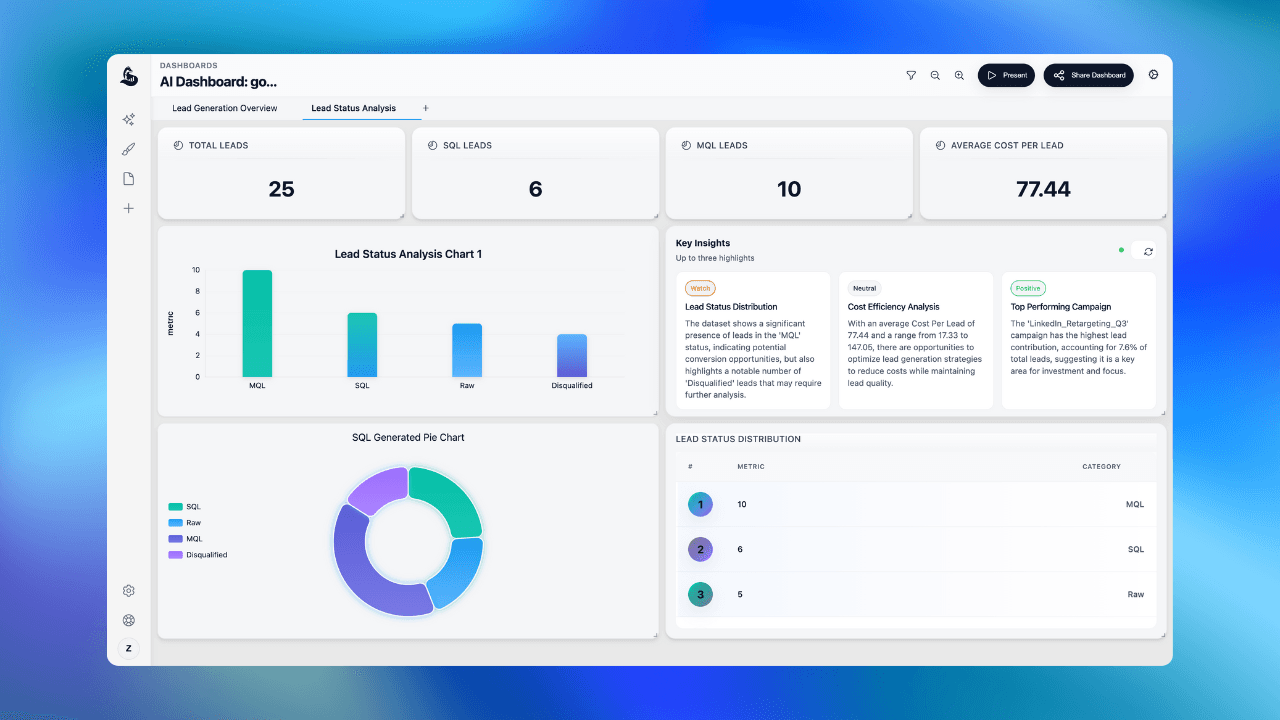
Clarifying questions
Start rough. AI asks follow-ups to frame the real problem.
Draft outputs
Turn conversations into briefs, plans, emails, or summaries.
Thread memory
AI remembers context. No need to repeat yourself.
How it works
Clarify, analyze, decide—in one thread.
Clarify
AI helps frame the question and objective.
Analyze
Structured reasoning and options, not just replies.
Decide
Summaries and next steps you can act on.
Context carries forward
Each follow-up builds on the last. Change formats or go deeper without restarting.
SQL and Python when needed
AI runs queries behind the scenes and responds with evidence and takeaways.
Best-performing products ranked by net revenue:
Quick insight: Business leads revenue at $40.3k, while Starter is unprofitable despite high volume — consider pricing review.
Chat capabilities
Context aware
Goals, constraints, and audience tracked in the thread.
Document aware
Attach briefs, notes, or reports. AI uses your sources.
Data aware
Link datasets. Get grounded analysis in responses.
Actionable outputs
Plans, summaries, and next steps ready to share.
Fast iteration
Test assumptions and explore options in minutes.
Shareable threads
Share conversations to align your team.
What you can ask
"Summarize this week's performance for leadership."
Highlights, risks, and next steps in one update.
"Compare three options and recommend one."
Side-by-side tradeoffs with a clear recommendation.
"What are customers complaining about most?"
Clustered themes with suggested fixes.
"How should we price this feature?"
Pricing logic, assumptions, and testing ideas.
"Create a 30-day rollout plan."
Milestones, owners, risks, and checkpoints.
"Draft a customer update about the new release."
Clear copy ready to send.
Attach documents or data
Add docs, paste notes, or connect a dataset. AI uses your context to answer.
Revenue by Segment
Monthly breakdown · YTD 2024
SELECT
  DATE_TRUNC('month', created_at),
  segment,
  SUM(revenue) AS total
FROM sales_transactions
GROUP BY 1, 2
ORDER BY 1;01What can I use AI Chat for?
What can I use AI Chat for?
Strategy, analysis, planning, writing, summaries. Designed for question-to-decision workflows.
Is it just Q and A?
02Can it use my data and documents?
Can it use my data and documents?
Yes. Attach documents or link datasets. AI can run SQL or Python for grounded analysis.
How does it stay accurate?
03Does the AI remember the conversation?
Does the AI remember the conversation?
Yes. Thread context is preserved. Follow-ups build on prior questions.
Can I ask follow-ups?
04Can I export the results?
Can I export the results?
Yes. Copy, share, or convert to reports and decks.
Can I share with my team?
05Is it safe to use with sensitive info?
Is it safe to use with sensitive info?
Access permissioned by user and project. Contact us for enterprise controls.
How is access controlled?